Key takeaways
- PCIe Gen3: Around 3,200 MB/s. Affordable and still excellent for gaming. A Silicon Power 2TB Gen3 or WD Green SN350 covers a secondary game library cheaply.
- PCIe Gen4: Roughly 7,000 to 7,450 MB/s. The current mainstream choice. The Samsung 990 PRO, WD_Black SN7100, Crucial P310, and KingSpec 2TB all sit here and hit real-world game load times that are hard to beat.
- PCIe Gen5: Up to around 14,700 MB/s on drives like the Samsung 9100 PRO. Impressive on paper, but for pure gaming the difference over a good Gen4 drive is small today. Buy Gen5 only if your workflow includes heavy file transfers.
Modern games have quietly become storage monsters. A single AAA title in 2026 can eat 150GB or more before you install a texture pack, and once you stack a launcher library, video captures, and the occasional creative project on top, a “roomy” drive fills up faster than most people expect. Running low on space is not just an inconvenience either. It forces uninstall-reinstall cycles, slows Windows, and can leave your system with no breathing room for updates and shader caches.
This guide walks through how much storage a gaming PC actually needs in 2026, why the type of drive matters as much as the capacity, and how to plan a setup that will not have you deleting favorites six months from now. By the end you will know what capacity to target, how to split fast and bulk storage, and which drives are worth the money.
Our top picks
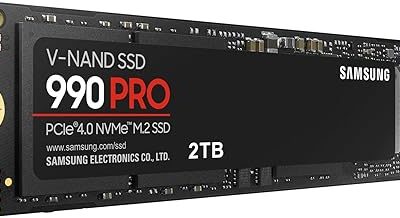
 Samsung SSD 990 PRO 2TB
- Product Group: Personal Computer
- Binding: Personal Computers


 Samsung SSD 9100 PRO 2TB
- Product Group: Personal Computer
- Binding: Personal Computers


As an Amazon Associate we earn from qualifying purchases at no extra cost to you. Ratings are shown as listed on Amazon.
⚡ Save on Your Next PC — Amazon Prime
Prime members get fast free shipping on the systems above, plus early access to Prime Day & Black Friday PC deals. New members get a 30-day free trial.
Watch: How Much Storage for a Gaming PC in 2026? — Video Review
How Much Capacity You Really Need
For a dedicated gaming machine in 2026, treat 1TB as the practical floor and 2TB as the comfortable sweet spot. A 1TB drive fills up after roughly six to ten big installs once Windows and its overhead take their share. A 2TB drive, like the Samsung 990 PRO 2TB or the WD_Black SN7100 2TB, lets you keep a rotating library of 15 to 20 titles installed without constantly juggling. If you also record gameplay, stream, or edit, plan for 4TB total across one or more drives.
Why NVMe SSDs Beat SATA and Hard Drives
The days of installing games on a mechanical hard drive are over for anyone who values load times. An NVMe SSD reads data many times faster than a SATA SSD and dramatically faster than a spinning disk, which shows up as shorter level loads, quicker fast travel, and smoother texture streaming in open-world titles. Windows itself also feels snappier on NVMe. If you are building fresh, put your operating system and your most-played games on an NVMe drive and never look back.
Understanding PCIe Generations and Speed Ratings
- PCIe Gen3: Around 3,200 MB/s. Affordable and still excellent for gaming. A Silicon Power 2TB Gen3 or WD Green SN350 covers a secondary game library cheaply.
- PCIe Gen4: Roughly 7,000 to 7,450 MB/s. The current mainstream choice. The Samsung 990 PRO, WD_Black SN7100, Crucial P310, and KingSpec 2TB all sit here and hit real-world game load times that are hard to beat.
- PCIe Gen5: Up to around 14,700 MB/s on drives like the Samsung 9100 PRO. Impressive on paper, but for pure gaming the difference over a good Gen4 drive is small today. Buy Gen5 only if your workflow includes heavy file transfers.
Splitting Storage: Fast Drive Plus Bulk Drive
A smart layout uses a fast primary drive for Windows and current favorites, then a larger or cheaper drive for the rest. Put your competitive shooter, your active RPG, and anything you launch daily on the quick Gen4 drive. Move finished single-player games, backups, and media onto a value QLC drive such as the WD Green SN350. This keeps your fast storage from filling up while still giving everything a home, and it makes reinstalling less painful because your bulk drive rarely needs wiping.
Endurance, DRAM, and What to Skip
Not every SSD is built the same. Drives with DRAM cache and TLC NAND, like the Samsung 990 PRO or Crucial P310, hold their speed under sustained writes better than budget DRAM-less QLC drives. For a boot and primary gaming drive, favor TLC. QLC is perfectly fine for a bulk library where you mostly read data rather than write it constantly. Also check the terabytes-written endurance rating if you plan to move large files often, though most gamers will never approach those limits in the drive’s lifetime.
Tips
- Buy one larger drive rather than two small ones when you can. It gives more flexibility and leaves M.2 slots free for future upgrades.
- Keep at least 10 to 15 percent of any SSD free so it maintains write performance and has room for shader caches.
- Match the drive to your motherboard slot. A Gen5 drive works in a Gen4 slot but only runs at Gen4 speeds, so do not overpay if your board is older.
- Enable a heatsink on high-speed Gen4 and Gen5 drives to avoid thermal throttling during long sessions.
Frequently Asked Questions
Is 1TB enough for gaming in 2026?
It works if you play only a few titles at a time and do not mind uninstalling to make room. Most people will be happier with 2TB, which holds a much larger active library without constant management.
Do I need a PCIe Gen5 SSD for gaming?
No. A quality Gen4 drive delivers game load times almost identical to Gen5 today. Gen5 mainly benefits large file transfers and content creation, so save the money unless your workflow needs it.
Can I mix an SSD and a hard drive?
Yes, and it is a common budget move, but even a slow SATA or Gen3 SSD for bulk storage beats a mechanical hard drive for load times. Reserve hard drives for cold archives, not active games.
Will adding a second SSD slow my PC down?
No. Adding a second NVMe or SATA SSD gives you more space with no performance penalty. Each drive runs independently, so your primary drive keeps its full speed.
Conclusion
Storage is one of the easiest places to future-proof a gaming PC without overspending. Aim for a 2TB Gen4 NVMe drive as your main workhorse, add a cheaper bulk drive if your library grows, and reserve Gen5 for the workflows that truly benefit. Get the capacity and drive type right up front and you will spend your time playing rather than shuffling installs.