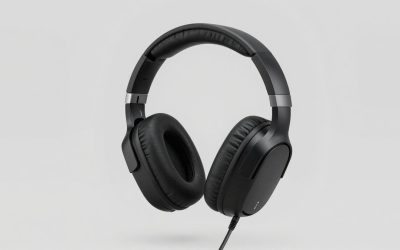
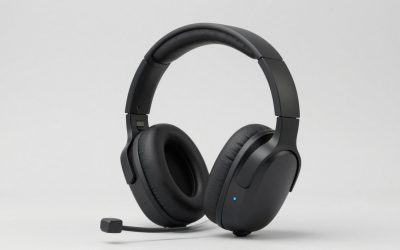
The best gaming headsets for under $400 range from simple wired models to wireless sets that can handle game audio and a phone call at the same time. The SteelSeries Arctis Nova Pro Wireless for Xbox is the best overall pick if you switch between systems and want active noise cancellation and swappable batteries. For most players who are happy with a cable, the HyperX Cloud III Wired covers game audio and voice chat for much less. Choose the Audeze Maxwell 2 if sound quality matters most, or the Razer BlackShark V2 Pro if you spend most of your time on PC voice comms.
The best gaming headsets for under $400 at a glance
Start with your platform and the way you want to connect. The Xbox version of the SteelSeries is the strongest fit for a desk with multiple systems. The wired HyperX is the first one to consider if you use a single controller or PC and mainly need game audio, a boom mic, and a mute control.
| Headset | Best for | Main connections and features | Main trade-off | U.S. listed price |
|---|---|---|---|---|
| SteelSeries Arctis Nova Pro Wireless for Xbox, white | Best overall for switching between systems | USB base station, 2.4 GHz wireless, simultaneous Bluetooth, active noise cancellation, swappable batteries | The base station takes up space and needs a USB connection | $349.99 |
| Audeze Maxwell 2, Xbox Edition | Sound quality for games and music | 90 mm planar magnetic drivers, 2.4 GHz wireless, Bluetooth, USB-C, and 3.5 mm | Heavy over-ear design and no active noise cancellation for listening | $349.00 |
| Razer BlackShark V2 Pro (2023), black PC edition | PC multiplayer and voice chat | 2.4 GHz USB wireless, Bluetooth, detachable wideband boom mic | This PC edition lacks Xbox wireless support and a 3.5 mm fallback | $104.97 |
| Logitech G PRO X 2 LIGHTSPEED, black | Switching among USB wireless, Bluetooth, and analog | 2.4 GHz USB wireless, Bluetooth, 3.5 mm, detachable mic | Its USB receiver lacks Xbox wireless support | $229.99 |
| HyperX Cloud III Wired, black/red | Affordable wired play across platforms | 3.5 mm, USB-C and USB-A connectivity, detachable boom mic | A cable stays attached while you play | $57.99 |
| Audio-Technica ATH-GDL3, black | Open-back listening in a quiet room | 3.5 mm analog, open earcups, detachable cable and mic | Game audio can leak out, and room noise can come in | $139.00 |
Prices are U.S. listing snapshots checked November 17, 2026, in USD before tax and shipping. They can change. If $400 is your total budget, use the checkout price for the exact edition and seller.
How we selected the best gaming headsets for under $400
Each pick had to be listed below $400 for the specific U.S. version shown and serve a distinct purpose. The comparison emphasizes platform support, connection options, microphone design, and practical trade-offs such as a base station, a charging routine, or sound leakage in a shared room.
The recommendations use manufacturer specifications, U.S. listings, and independent evaluations where they address a buying decision. RTINGS’ comparison helps distinguish the Maxwell 2’s sound and microphone performance from the SteelSeries’ features. Independent reviews of the 2023 BlackShark V2 Pro inform the PC voice-chat pick. This roundup involved no firsthand testing. Comfort, microphone behavior, and sound can vary with fit and setup.
Which headset should you buy?
The two premium models cost almost the same in the listings checked, but solve different problems. SteelSeries makes it easier to manage several audio sources. Audeze is the better fit if you care more about what games, music, and voices sound like through the headset. The other four picks make sense when your priorities are narrower.
SteelSeries Arctis Nova Pro Wireless for Xbox — Best overall
The white Xbox edition, model 61525, is the most versatile pick here for a setup that includes an Xbox and another system. Its base station lets you keep two supported systems connected and switch between them. The headset also supports simultaneous Bluetooth, so you can keep a phone connected while using the gaming wireless link.
The swappable batteries are a reason to choose this model even if you rarely use Bluetooth. One battery can charge at the station while the other powers the headset. That’s worthwhile if you play often and tend to forget to plug in your gear. Active noise cancellation also makes this a better fit than the open-back Audio-Technica if you share a room or play near a steady background hum.
Keep in mind that switching between the two USB systems and hearing Bluetooth alongside game audio are separate functions. Think through which two devices you’ll connect and where the station will sit. Buy if you regularly switch between systems or want game and phone audio together. Skip if you play on one device and would get more from the Maxwell 2’s sound or the HyperX’s lower price.
Audeze Maxwell 2 Xbox Edition — Best for games and music
The standard Maxwell 2 Xbox Edition, model 207-MW-1125-01, pairs 90 mm planar magnetic drivers with a detachable boom microphone. It’s the premium pick for someone who wants one headset for games and music. RTINGS found its tested Maxwell 2 had a more balanced sound profile and captured voices more accurately than its tested Arctis Nova Pro Wireless.
Fit matters with this model. RTINGS also found that bass response could change considerably depending on how the headset sealed around the ears. If you wear glasses, check the sound while wearing the frames you normally use at your desk. The heavier build is also worth trying during a longer session before you decide whether it’s comfortable.
The Xbox Edition is the right one in this family if you need wireless Xbox support. Check that the listing says Maxwell 2 Xbox Edition because the original Maxwell, the PlayStation edition, and the separate Maxwell 2 ANC model are different products. Buy if you want balanced sound and a capable boom mic for Xbox or PC. Skip if you prioritize active noise cancellation for listening, frequent platform switching through a base station, or a lighter headset.
Razer BlackShark V2 Pro (2023) PC edition — Best for PC voice chat
The black 2023 PC model, RZ04-04530100-R3U1, is the pick for players who spend most sessions talking over Discord or in-game chat. Its detachable wideband boom mic is the feature that makes it stand out. SoundGuys’ review of the 2023 revision highlighted microphone quality, while Tom’s Hardware confirmed the revision’s 2.4 GHz wireless and Bluetooth connections.
The USB wireless connection is the one to plan around for PC play. Bluetooth gives you another way to connect to a compatible device. If you frequently use a controller jack, the Logitech or HyperX is the more practical choice because this Razer revision lacks a 3.5 mm input. Also check the platform on the box. The separate Xbox and PlayStation editions share the BlackShark V2 Pro name.
At the retailer price reviewed, the Razer is an appealing step up from wired play for buyers who want a good boom mic without a base station. The listing price can change, and the manufacturer’s direct listing showed a different price and availability. Buy if you want wireless PC chat and a detachable boom. Skip if you need Xbox wireless or want a wired analog fallback.
Logitech G PRO X 2 LIGHTSPEED — Best for flexible connections
The black PRO X 2 LIGHTSPEED, model 981-001262, fits a setup where you use a USB receiver on your PC or PS5, Bluetooth on another device, and occasionally the 3.5 mm cable. That analog option makes it more flexible than the 2023 Razer PC edition if you already own equipment with a headphone jack.
For PlayStation, buy it for the USB wireless stereo features listed for that platform. Treat PC software features such as Blue VO!CE as part of the PC experience when considering whether the price is worth it. If you want two audio sources playing at once, the SteelSeries explicitly supports simultaneous Bluetooth and game wireless. The Logitech’s appeal here is having multiple ways to connect.
The Logitech costs substantially more than the wired HyperX in the listings checked. The difference makes sense if you’ll use its wireless modes regularly and want to keep analog available. Buy if you switch among USB wireless, Bluetooth, and a cable. Skip if you only need a wired headset or intend to use the USB receiver for wireless Xbox play.
HyperX Cloud III Wired — Best affordable wired pick
The black/red Cloud III Wired, model 727A9AA, is the best place to start if your priority is game audio and voice chat at a low price. It has a detachable boom mic, and the mic’s mute indicator lets you see when you’re muted. The headset can connect through 3.5 mm and supports USB-C and USB-A connections on compatible devices.
For Xbox, plan to plug the 3.5 mm connection into a compatible controller. If you split your time between a console and a PC, verify that both devices have the ports you expect to use before buying. On a couch, a controller connection also keeps the headset cable close to you, which may make wireless less important than it would be at a desk.
The money saved is meaningful if you already get along with a cable. The Audio-Technica is the better fit when you specifically want an open-back design for a quiet room. Buy if you want a dependable connection method and simple controls at the lowest listed price here. Skip if you regularly get up with the headset on or want Bluetooth phone audio during a game.
Audio-Technica ATH-GDL3 — Best open-back headset for a quiet room
The black ATH-GDL3, model ATH-GDL3BK, is a wired, open-back headset with a detachable boom mic and detachable cables. Its open earcups let you hear more of your surroundings. That can suit a private room where you want to hear your own voice naturally while talking to teammates or stay aware of what’s happening around you.
The same openings let game audio escape. If you sit near someone working, hear fans or TV dialogue at your desk, or often play beside a sleeping partner, a closed design such as the Cloud III Wired is a better starting point. The open design also gives you a different listening experience without guaranteeing that footsteps will be easier to locate in every game.
Check the analog input on the device where you’ll use it. For a controller, confirm that the jack carries both stereo audio and microphone input. If you’re connecting to a desktop PC, check whether it has a combined headset jack or separate mic and headphone ports. Buy if you play in a quiet space and want a wired headset that lets outside sound through. Skip if you need privacy, isolation, or wireless connectivity.
What matters before you spend more
The jump from a basic wired headset to a premium wireless one is easiest to justify when you can name the feature you’ll use most days. For some players, that’s hearing a phone and a console at once. For others, it’s a microphone suited to frequent team chat or a sound profile they also enjoy with music.
Verify the connection for the exact console
Match your platform to the connection method before comparing sound, battery life, or software features. Xbox buyers should look for explicit Xbox support on the exact wireless variant. A USB receiver marked for PC or PlayStation can look similar to the Xbox version even when it lacks Xbox compatibility.
If you play on PS5 or PC, check the features you care about on that device. Stereo game audio can be supported even when a manufacturer’s microphone filters, EQ controls, or other software options require a PC. If you use party chat, confirm both audio output and microphone input for the connection you plan to use.
Choose for the room you play in
Listen to the room before picking an earcup design. A fan, air conditioner, or TV may be easy to ignore until you’re trying to hear dialogue or a teammate. A closed design is usually the more practical starting point in that setting. Active noise cancellation may be worth paying for if steady room noise frequently distracts you.
In a quiet room, open-back audio can feel less sealed in. Consider who sits nearby and how much leakage they can hear at your normal volume. If you wear glasses, prioritize fit as well. The frames can interrupt the ear-pad seal on some closed models, and the change may be most obvious in the bass.
Compare microphone quality with your actual chat setup
If you play multiplayer several nights a week, the microphone may affect your experience more often than an extra sound mode. Independent voice recordings can help you compare how intelligible speech sounds. Listen for consonants, volume changes, and whether the mic picks up typing or room noise similar to yours.
Keep listening noise cancellation and microphone noise filtering separate when comparing spec sheets. The first affects what reaches your ears. The second affects what teammates hear. Positioning matters for either a wired or wireless boom mic. If your voice sounds distant or teammates hear your keyboard, move the boom into position and check its level before replacing the headset.
Frequently asked questions
Once you have a shortlist, look for any accessory or feature you’d need to pay for separately. The common examples are a controller connection, a desktop with separate audio jacks, or software you expected to use on a console. Checking those details can change which listing is the better purchase.
Do you need to spend close to $400 for competitive gaming?
You can spend considerably less if you mainly need clear game audio and a boom microphone. The Cloud III Wired is the starting point here if a cable works for you. The Razer is a better fit if you primarily play on PC and want a wireless headset with a microphone suited to regular team chat.
Spend more when you can point to something you’d miss in the cheaper model, such as simultaneous Bluetooth, active noise cancellation, or a stronger fit for listening to music. If your main complaint is inconsistent directional audio, try one spatial processing setting at a time. Stacking the game’s spatial audio and a headset effect can make it harder to tell which one suits you.
Will a headset plugged into an Xbox controller carry voice chat?
A compatible Xbox controller with a combined 3.5 mm headset jack can carry stereo audio and microphone input from a compatible wired headset such as the Cloud III Wired. If you use an older Xbox One controller, check whether it has the jack or needs a compatible headset adapter.
If you can hear the game but the party cannot hear you, check that the headset plug and detachable mic are fully seated, verify the mute control, and check the console’s audio settings. A 3.5 mm connection is also useful if you routinely move the same headset between a console controller and another compatible device.
Conclusion
Choose the SteelSeries Arctis Nova Pro Wireless for Xbox if you’ll regularly switch systems, use Bluetooth alongside game audio, or swap batteries between sessions. Choose the standard Audeze Maxwell 2 Xbox Edition if balanced sound for games and music matters more and you’re comfortable with the heavier fit. For a PC setup focused on team chat, consider the 2023 Razer BlackShark V2 Pro. If you’re happy with a cable, start with the HyperX Cloud III Wired. It covers game audio and voice chat for a fraction of the budget, leaving room to spend elsewhere.
More from Amazon
Programs that pair well with the guide above. Offers and eligibility are set by Amazon and may change.
Set up recurring deliveries of everyday items on eligible products. Terms and savings are set by Amazon.
Explore Subscribe & SaveFree shipping on eligible items, Prime Video and more. Eligible new members can start with a free trial.
Start a Prime free trialA Prime membership for ages 18-24 with a trial period. Eligibility is set by Amazon.
See Prime for Young AdultsAudiobooks and podcasts to listen to on the go. Eligible new members can start with a free trial.
Try Audible freeAs an Amazon Associate we earn from qualifying purchases.