Key takeaways
- A monitor and required display cable.
- Keyboard, mouse, audio equipment, or a controller.
- Wi-Fi or Bluetooth hardware when needed.
- Additional storage or memory.
- An operating-system license if absent.
- Shipping, sales tax, and possible return costs.
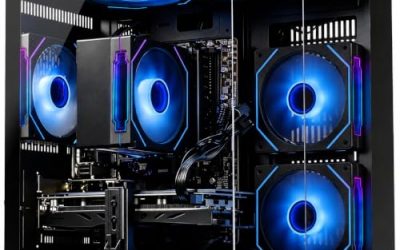
The best budget gaming PC is the lowest-cost complete system that meets your games, resolution, and performance goals without requiring immediate repairs or upgrades. For many buyers, that means a desktop built around a capable dedicated graphics card, a suitable processor, at least 16GB of RAM, and SSD storage. But what is the best budget gaming pc for someone playing lightweight competitive games may differ substantially from the right choice for demanding single-player releases. Start with the games you actually play, then compare complete configurations and total costs. A familiar brand name or an impressive-looking case cannot establish gaming value by itself.
What is the best budget gaming PC for most buyers?
For a buyer who wants to play a broad mix of games, a sensible starting point is a balanced desktop designed around 1080p gaming. Prioritize a graphics card with documented performance in your games, enough CPU capability for your frame-rate target, and sufficient memory and storage for everyday use.
That is a configuration recommendation rather than a universal winning model. Prebuilt names often cover several configurations, and prices change. Two desktops with the same product-family name can contain different graphics cards, memory arrangements, power supplies, and cooling systems.
Use this starting checklist to decide whether a system deserves closer inspection:
| Component or feature | Practical starting point | What could change the decision |
|---|---|---|
| Graphics | A dedicated GPU supported by relevant game benchmarks | Integrated graphics may be sufficient for selected lighter games |
| Processor | An exact CPU model with adequate performance for the intended games | High-refresh competitive play and simulation games can increase CPU demands |
| Memory | At least 16GB for a general-purpose gaming purchase | Some games, mods, and multitasking workloads justify 32GB or more |
| Storage | SSD storage with enough room for the intended library | A smaller drive may work if you keep few games installed |
| Power and cooling | Identifiable components suitable for the installed hardware | Future upgrades may require additional capacity or clearance |
| Operating system | A supported OS compatible with the intended games | Older refurbished systems need closer compatibility checks |
| Support | Clear return terms and warranty coverage | DIY and used purchases distribute responsibility differently |
These are screening criteria, not guarantees that a PC will achieve a particular frame rate. The exact hardware and game settings still determine the result.
What is the best budget gaming PC if you mainly play competitive games?
For competitive gaming, choose around the frame rate you want to maintain during actual matches. A system that handles visually demanding games reasonably well is not automatically the strongest choice for a high-refresh competitive setup.
Lowering graphics settings can reduce GPU workload, but it does not remove CPU limits. The processor, memory configuration, and game engine can still constrain performance, particularly when targeting high frame rates.
Look for testing that reflects your intended settings and includes demanding gameplay. An average measured in a quiet area may not represent a crowded fight. Frame-time consistency and performance dips matter alongside the average.
If your monitor refreshes at 144 Hz, the relevant question is whether the system delivers suitably consistent performance in your games. A seller’s broad “high-FPS gaming” claim does not answer that question.
Define your gaming target before choosing a price range
“Budget” describes a spending constraint, not a fixed performance category. Someone replacing only a desktop tower has a different purchasing problem from someone buying a first setup with a monitor, keyboard, mouse, and headset.
Write down three things before comparing systems: your main games, your display resolution, and the performance you consider acceptable. Then decide which graphics compromises you are willing to make.
Separate basic playability from the experience you want
Minimum requirements usually describe a lower threshold than many buyers expect from a new purchase. They should not be interpreted as a promise of high settings or smooth high-refresh gameplay.
Epic’s Fortnite documentation illustrates the distinction. It provides separate minimum, recommended, and Epic quality specifications. Its recommended configuration lists 16GB of RAM and an NVMe SSD, while its Epic quality specification calls for substantially stronger graphics hardware.
The implication is straightforward: “runs Fortnite” is incomplete information. You also need to know the settings and performance target. The same principle applies when a listing advertises compatibility with several popular games without explaining how they were tested.
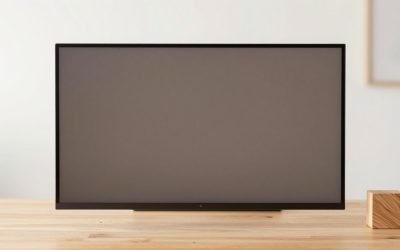
Match the purchase to your monitor
A 1080p monitor is a practical starting point when controlling graphics costs. Moving to a higher resolution increases the number of pixels the graphics system must process, although the actual performance difference depends on the game and settings.
For perspective, 2560 × 1440 contains about 78% more pixels than 1920 × 1080. That does not translate into a universal 78% increase in hardware requirements, but it helps explain why a PC suitable for one resolution may need settings adjustments at another.
If you already own a 1440p display, evaluate systems at that resolution. If you are buying the display too, compare the combined cost of the PC and monitor rather than selecting them independently.
Which specifications deserve most of the budget?
The most useful allocation depends on the workload. For visually demanding games, graphics capability often deserves priority. For CPU-heavy games or very high frame-rate targets, spending too little on the processor can undermine an otherwise capable system.
The goal is a balanced configuration for a defined task, rather than equal spending on every component.
Choose the GPU by its exact model and tested capability
A listing that says only “dedicated graphics” leaves out the information needed to judge performance. You need the GPU model and relevant variant, including its video-memory capacity.
VRAM capacity is useful information, but it does not rank graphics cards by itself. A card with more memory is not automatically faster. Architecture, processing capability, memory bandwidth, software support, and the game workload all influence the outcome.
Read performance results at your intended resolution and settings. Also check whether upscaling, ray tracing, or frame generation was enabled. Those settings can materially change the reported result.
A component benchmark helps assess the GPU’s capabilities. It does not establish the performance of every prebuilt containing that GPU, because the rest of the system and its operating limits still matter.
Read the full CPU name instead of the marketing tier
“Core i7” or “Ryzen 7” is not enough detail to evaluate a processor. Generation and exact model matter, and a higher-tier older processor should not automatically outrank a newer lower-tier one.
Compare the actual CPUs in relevant tests. A buyer playing strategy games with complex simulations may reasonably prioritize different results from someone playing graphically demanding action games.
Avoid paying for unused CPU capability while accepting a graphics card that cannot meet your target. Equally, do not assume the cheapest processor is sufficient simply because the PC includes a strong GPU.
Treat RAM capacity and configuration as separate checks
For a broadly useful gaming desktop, 16GB is a reasonable starting point. Intel’s gaming guidance also identifies that capacity as a baseline, while noting that heavier multitasking and other workloads can require more.
However, capacity alone does not describe the memory setup. Check whether the system uses one or multiple modules, which slots are occupied, and whether expansion would require replacing existing memory.
Do not assume a “16GB” listing has a particular configuration. If an upgrade matters to your buying decision, verify the motherboard’s supported memory, available slots, and compatibility requirements before assigning value to it.
A 32GB configuration can be worthwhile for memory-heavy games, extensive mods, or concurrent applications. It should not automatically take priority over a more consequential graphics upgrade.
Buy enough SSD capacity for your actual library
SSD storage is an important part of a modern gaming system. Some games explicitly require it, and a hard drive should not be treated as an equivalent substitute merely because it offers more capacity.
A 1TB SSD is a useful shopping target when you want several substantial games installed. It is an editorial convenience target, not a universal requirement. A smaller SSD can be workable for a limited library if the savings are meaningful.
Check available capacity after the operating system and applications, and consider the size of the games you intend to install. An additional storage slot is valuable only if it supports the drive you plan to add and is actually available.
Prebuilt, DIY, or used: which route offers better value?
No purchasing route wins automatically. Compare complete costs and the responsibilities you are accepting.
| Route | Main advantage | Main trade-off | Who should consider it |
|---|---|---|---|
| New prebuilt | One assembled system with defined seller support | Component details and upgrade flexibility vary | Buyers who want a straightforward purchase |
| DIY build | Control over component selection | Assembly, compatibility checks, and diagnosis are your responsibility | Buyers comfortable researching and troubleshooting |
| Used complete PC | Potential access to capable hardware at a lower purchase price | Condition, support, and upgrade history require verification | Buyers who can inspect or test the system |
| Refurbished office PC | Can suit limited gaming needs with careful selection | Case, power, and compatibility restrictions may limit upgrades | Buyers with modest requirements and clear documentation |
Compare a prebuilt with an equivalent complete DIY list
A prebuilt may include an operating-system license, assembly, and system-level support. A DIY comparison that omits those items does not establish the actual savings.
Include the case, motherboard, cooling, power supply, storage, memory, networking, and any required operating system. Add shipping and applicable sales tax consistently.
Then examine the prebuilt’s unspecified components. “Quality power supply” is less useful than an identifiable model and documented specifications. A prebuilt can still be worth buying, but its value should rest on information you can evaluate.
Inspect used systems before assigning value to the parts
A used PC’s specification list describes what is installed, not how well the system currently operates. Check that the machine recognizes its components, runs a representative workload without crashes, and does not show obvious display artifacts.
Ask about modifications, repairs, and any transferable coverage. Confirm the seller’s return terms rather than assuming protections associated with a new purchase.
Refurbished office desktops need additional scrutiny before a GPU upgrade. Card clearance, case width, power connectors, and power-supply compatibility can determine whether the plan is practical. A cheap base computer is not necessarily a cheap finished gaming PC.
How to compare two budget PCs without being misled
Compare the delivered systems against the same target. Start with their CPU and GPU, then examine memory, storage, cooling, power, support, and any immediate spending required.
Consider this hypothetical comparison:
| Detail | PC A | PC B |
|---|---|---|
| Processor | More expensive CPU than the intended games require | CPU adequate for the stated gaming target |
| Graphics | GPU falls short of the target in relevant tests | GPU meets the target in relevant tests |
| Memory and storage | Meets the buyer’s requirements | Meets the buyer’s requirements |
| Appearance | More lighting and a larger showcase case | Simpler case |
| Likely decision | Difficult to justify for this gaming use | Stronger candidate if total cost and other essentials are acceptable |
This example does not establish that simpler PCs are always better. It shows why the component that changes your gaming experience deserves more attention than presentation.
Read benchmark claims carefully. A useful result identifies the game, resolution, graphics settings, and relevant test configuration. Treat a lone FPS number without those conditions as insufficient evidence.
Also distinguish rendered performance from results that include frame generation. Generated frames can improve visual fluidity, but a higher displayed frame count does not by itself establish the same input responsiveness as an equally high rendered frame rate.
The hidden costs that can erase a bargain
Calculate what you will spend to reach a usable setup. A low tower price can become less attractive once necessary additions are included.
Potential additions include:
- A monitor and required display cable.
- Keyboard, mouse, audio equipment, or a controller.
- Wi-Fi or Bluetooth hardware when needed.
- Additional storage or memory.
- An operating-system license if absent.
- Shipping, sales tax, and possible return costs.
An immediate upgrade should be included in the purchase comparison. If a PC needs more RAM or storage to meet your requirements, evaluate its upgraded total against systems that already include those components.
For older Windows machines, verify official Windows 11 eligibility rather than relying on the presence of an installed copy. Microsoft lists hardware requirements that include supported processors, TPM 2.0, and Secure Boot capability. Windows 10 reached its standard end of support on October 14, 2025; an older game listing mentioning Windows 10 does not establish an appropriate long-term OS plan for a new purchase.
What can you compromise on without undermining the purchase?
Start with features that do not materially affect your requirements. Decorative lighting, elaborate case styling, and premium cosmetic finishes are reasonable places to save.
Graphics settings are another useful adjustment. You may prefer a less expensive system running a carefully chosen preset over a larger purchase made solely to enable every visual option. The acceptable compromise depends on the game and your preferences.
Storage capacity can sometimes be reduced initially if the installed library is small and expansion is documented. However, that is different from buying too little memory or an unsuitable GPU and assuming a future upgrade will be easy.
Avoid planning around unknowns. If the motherboard, power supply, or case dimensions are undocumented, do not assign substantial value to hypothetical upgrades. Buy a system that meets the current requirement first, then consider verified expansion options.
Frequently asked questions
Do you need a dedicated graphics card for budget gaming?
Not always. Some integrated graphics solutions can handle selected lighter or older games at suitable settings. For a wider range of demanding games, a dedicated GPU is generally the more useful starting point. Judge the exact graphics hardware using relevant tests; neither “integrated” nor “dedicated” is a performance rating by itself.
Is 16GB of RAM enough?
It is a reasonable starting point for many gaming purchases, but game requirements and concurrent applications vary. Check your intended titles and workload. Choose more capacity when there is a demonstrated need, and verify the installed memory arrangement before assuming expansion will be inexpensive.
Does a faster SSD increase FPS?
A faster SSD should not be treated as a substitute for a suitable CPU or GPU. Storage can affect loading and asset delivery, and some games require an SSD, but a higher advertised transfer speed does not promise a corresponding increase in average FPS. Look for game-specific evidence before paying a premium for that purpose.
Is an older high-end PC better than a newer budget PC?
It can be, but the label does not settle the comparison. Evaluate current game performance, operating-system compatibility, power requirements, condition, and support. An older high-end system may offer useful performance while also carrying costs or restrictions that a newer system avoids.
How much should you spend on a first gaming PC?
Set the budget from the complete setup and your gaming target. Obtain current quotes for systems that meet those requirements, then compare delivered costs. A fixed spending figure without a resolution, game list, or peripherals allowance can create the wrong expectation about what the money buys.
Conclusion
The best budget gaming PC is a complete system that meets your gaming target at a competitive total cost. For many buyers, the sensible starting point is 1080p gaming, a capable dedicated GPU, an appropriate CPU, at least 16GB of RAM, and SSD storage. Verify the exact configuration, compare performance under relevant conditions, and include any immediate upgrades in the price. Prebuilt, DIY, and used systems can each make sense when their costs and responsibilities fit your situation. Choose the documented configuration that serves your games, rather than relying on branding, appearance, or an unexplained FPS claim.