Key takeaways
- Immersion: Curved screens fill more peripheral vision and pull you into the scene; flat screens present a cleaner, more detached window that some players prefer for situational awareness.
- Geometry accuracy: Flat panels keep horizons, crosshair lines and UI elements perfectly straight, while curved panels introduce slight bowing that is invisible in most games but noticeable in level editors, spreadsheets and photo work.
- Optimal seating distance: Curvature ratings assume a specific distance — 1000R suits roughly one metre, 1500R and 1800R suit progressively further back. Flat monitors are far more forgiving of where you sit and how off-axis you view them.
- Screen size scaling: Above 27 inches, flat panels start to feel wide at the edges; this is exactly where curved models such as the 32″ 240Hz Curved VA earn their keep.
- Reflections and lighting: Flat surfaces reflect light predictably; curved surfaces can smear a window or lamp across a wider area, so room lighting matters more.
- Multi-monitor and mounting: Flat displays sit flush side by side and mount cleanly; curved models can be arrayed but leave visible seams and need more arm clearance, even when VESA compatible.
The curved versus flat debate has outlived most monitor trends, and for good reason: it is one of the few specs that changes how a display feels rather than how it benchmarks. Curved panels wrap the edges of the image slightly toward you, shortening the distance your eyes travel to the corners. Flat panels keep every pixel on a single plane, preserving perfectly straight geometry. Neither is objectively better — they optimise for different things, and the right answer depends on how close you sit, what you play, and whether the same screen doubles as a work display.
In 2026 the decision matters more than it used to, because curvature is no longer a premium upsell. Aggressive 1000R and 1500R panels now appear on budget 1080p monitors, and 240Hz refresh rates have filtered down to the same price bracket that bought a basic 75Hz office screen a few years ago. That means you are rarely paying extra for the curve itself — you are choosing between two viewing experiences at roughly the same cost. Below we break down where each format wins, and which of the current picks suits each type of player.
Our top picks


As an Amazon Associate we earn from qualifying purchases at no extra cost to you. Ratings are shown as listed on Amazon.
⚡ Save on Your Next PC — Amazon Prime
Prime members get fast free shipping on the systems above, plus early access to Prime Day & Black Friday PC deals. New members get a 30-day free trial.
Watch: Curved vs Flat Gaming Monitor: 2026 Guide — Video Review
Quick Verdict
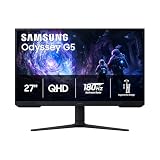
Choose a curved monitor if you sit close, want an immersive single-screen setup, or are buying anything 32 inches or larger — the curve genuinely reduces eye strain at the edges. Options like the SANSUI 32″ Curved 240Hz and the Samsung Odyssey G55C deliver that immersion without sacrificing speed. Choose flat if you rely on straight-line accuracy for competitive shooters, build multi-monitor arrays, do design or CAD work, or simply dislike the way reflections stretch across a curved surface. If you want a middle path, a gentle 1800R panel such as the Samsung Essential S3 behaves almost exactly like a flat screen with a little extra edge comfort.
Key Differences
- Immersion: Curved screens fill more peripheral vision and pull you into the scene; flat screens present a cleaner, more detached window that some players prefer for situational awareness.
- Geometry accuracy: Flat panels keep horizons, crosshair lines and UI elements perfectly straight, while curved panels introduce slight bowing that is invisible in most games but noticeable in level editors, spreadsheets and photo work.
- Optimal seating distance: Curvature ratings assume a specific distance — 1000R suits roughly one metre, 1500R and 1800R suit progressively further back. Flat monitors are far more forgiving of where you sit and how off-axis you view them.
- Screen size scaling: Above 27 inches, flat panels start to feel wide at the edges; this is exactly where curved models such as the 32″ 240Hz Curved VA earn their keep.
- Reflections and lighting: Flat surfaces reflect light predictably; curved surfaces can smear a window or lamp across a wider area, so room lighting matters more.
- Multi-monitor and mounting: Flat displays sit flush side by side and mount cleanly; curved models can be arrayed but leave visible seams and need more arm clearance, even when VESA compatible.
Curved Gaming Monitors: Immersion and Edge Comfort
The core argument for curvature is ergonomic. Because your eyes are roughly spherical, a curved panel keeps the corners at a similar focal distance to the centre, which reduces the constant refocusing that causes fatigue during long sessions. The effect is subtle at 24 inches but obvious at 32 inches, which is why the SANSUI 32″ Curved 240Hz and the 1800R 32-inch VA option feel comfortable at desk distance in a way that a flat 32-inch screen often does not. Racing sims, flight sims, open-world RPGs and horror games benefit most, since the wrap adds a genuine sense of enclosure.
Curved VA panels also tend to carry strong contrast figures — the SANSUI 27″ Curved 240Hz quotes 4000:1 with 130% sRGB coverage — which makes dark scenes look deeper than typical budget IPS alternatives. The trade-off is VA’s slower dark-to-dark pixel transitions, so look for MPRT ratings and backlight strobing if smearing bothers you. For a curved panel that steps up in resolution rather than raw speed, the Samsung Odyssey G55C pairs QHD sharpness with 165Hz and a pronounced 1000R curve, which is the most enveloping option here for anyone sitting close.
Flat Gaming Monitors: Accuracy and Versatility
Flat panels remain the default for competitive play. Not because curvature harms performance — it does not measurably affect input lag or refresh rate — but because consistency matters when you have trained on a particular sight picture. Straight geometry also makes flat screens the safer choice for anyone editing video, drawing, modelling or working with grids, where a bowed horizontal line is an active annoyance rather than a novelty.
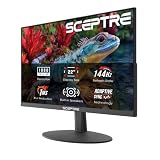
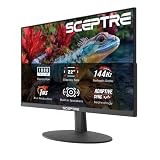
Flat displays are the practical pick for triple-monitor rigs, tight desks, wall mounting and shared spaces where people view the screen from an angle. Worth noting: every model in this comparison is curved to some degree, so if you are set on a true flat panel you will be shopping outside this list. If you want the closest compromise, the Samsung Essential S3 uses a mild 1800R curve with a 100Hz refresh rate and D-sub plus HDMI inputs, making it the most flat-like and most office-friendly option, while the Sceptre 24-inch C248W-1920RN keeps the curve gentle on a small panel where distortion is minimal anyway.
Which Should You Buy?
- For immersive single-player and sim racing: pick a strong curve — the Samsung Odyssey G55C at 1000R QHD, or the SANSUI 32″ Curved 240Hz for maximum speed at 1080p.
- For competitive FPS: pick flat, or the flattest high-refresh option you can find; if you go curved, the SANSUI 27″ Curved 240Hz keeps the panel small enough that distortion is negligible.
- For a tight budget or a second screen: pick the Sceptre 24-inch curved — built-in speakers, dual HDMI and VESA mounting cover the basics.
- For work first, gaming second: pick the Samsung Essential S3, whose gentle 1800R curve and eye-comfort features suit long spreadsheet days.
- For the biggest screen per dollar: pick a 32-inch curved model such as the 1800R 240Hz VA — at that size, the curve stops being cosmetic.
Frequently Asked Questions
Are curved monitors actually better for gaming?
They are better for immersion and edge-of-screen comfort, particularly at 32 inches and above. They offer no competitive advantage in reaction time or latency, so a curved panel is a comfort and preference upgrade rather than a performance one.
Does curvature distort the image in shooters?
Slightly, but games render in 3D perspective and adapt naturally, so most players stop noticing within a few hours. Distortion is far more apparent in 2D content — documents, image editing and strategy grids — than in first-person gameplay.
What do 1000R, 1500R and 1800R mean?
The number is the radius of the curve in millimetres, and a lower figure means a more aggressive wrap. 1000R is the most immersive and assumes you sit around a metre away; 1500R is a balanced middle ground; 1800R is subtle and closest to flat.
Can you wall-mount or dual-mount a curved monitor?
Yes — most curved gaming monitors, including the SANSUI and Sceptre models here, are VESA compatible. Just allow extra depth clearance, and expect a visible seam angle if you place two curved screens side by side.
Final Verdict
If you game on a single screen and sit at normal desk distance, curved is the easier recommendation in 2026: you get the immersion and reduced edge fatigue at no real price premium, and options like the SANSUI 32″ Curved 240Hz or the Samsung Odyssey G55C cover both the high-refresh and high-resolution ends of the market. Stay flat, or choose a mild 1800R panel like the Samsung